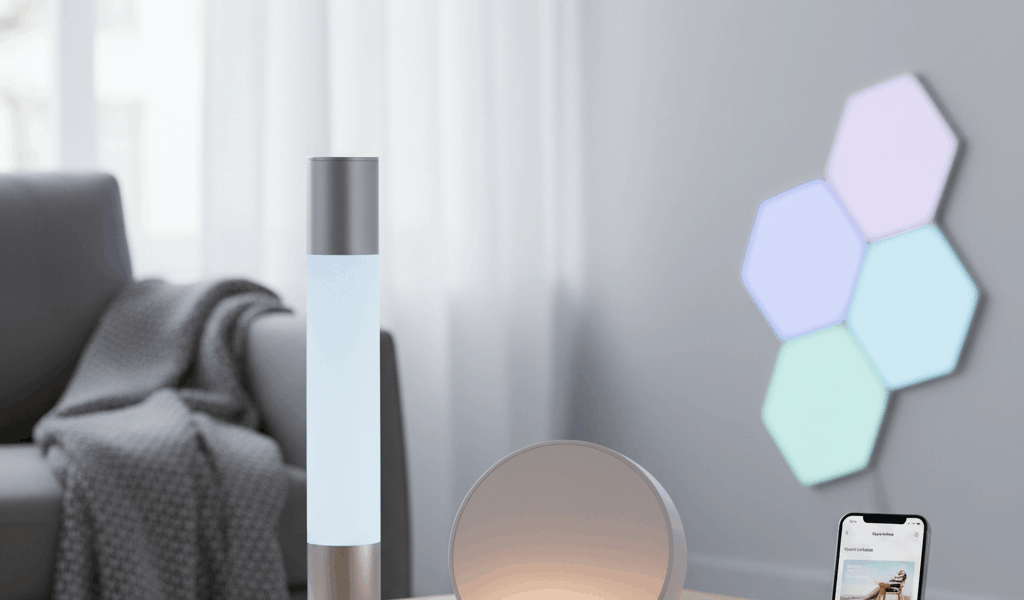
Smart Lighting That Transforms Your Home and Improves Your Sleep
Smart lighting has gotten complicated with all the competing ecosystems and buzzwords flying around. As someone who spent three months testing different setups in my own home, I learned everything there is to know about making lights work smarter. Today, I will share it all with you.

Here’s the thing nobody tells you upfront: your body actually cares about what color your lights are. Blue-ish light in the morning wakes you up. Warm, dim light at night tells your brain it’s time to sleep. I didn’t believe this until I tried it myself—and now I can’t go back to regular bulbs.
Color Temperature and Circadian Health
Probably should have led with this section, honestly. Morning light needs to be bright and cool—we’re talking 5000-6500 Kelvin range. That mimics actual daylight and helps shake off the grogginess. Smart bulbs can do this automatically so you don’t have to think about it.
For the middle of the day, especially if you work from home, you want something around 4000 Kelvin. Bright enough to stay focused but not so harsh that your eyes feel like they’re being interrogated by a desk lamp.
Evening is where the magic happens. You drop the color temperature down to 2700K or lower—think candle-warm—and suddenly your brain starts producing melatonin naturally. I started sleeping better within a week of setting this up.
Don’t forget brightness, though. Even warm light at full blast still messes with your sleep. Dim everything down to maybe 30% after dinner and you’ll notice the difference.
Automation Makes Everything Actually Work
Nobody wants to adjust their lights six times a day. That’s what makes smart lighting endearing to us gadget people—you set it once and forget it.

The best part? Good systems adjust for sunrise and sunset throughout the year. Your evening routine shifts automatically in winter when it gets dark at 4pm. No fiddling required.
Motion sensors are a game-changer too. Walk into a room, lights come on. Leave the room, they turn off. My electricity bill dropped noticeably once I set this up properly.
Geofencing takes it further—lights come on when you pull into your driveway. Coming home to a lit house instead of fumbling for switches in the dark? That’s the small luxury that makes smart home stuff worth it.
Zones and Scenes Simplify Control
Grouping lights by room means you can say “turn off the bedroom” instead of naming every single bulb. Sounds obvious, but getting this organization right upfront saves headaches later.
Scenes are where it gets fun. My “Movie Night” scene dims the living room to 10%, sets everything warm, and kills the kitchen lights. One button press. Done.
The really clever trick is adaptive scenes that change based on time. “Relax” at 3pm looks different than “Relax” at 9pm, automatically adjusting brightness for where the sun is.
Entertainment and Ambiance Applications
Color bulbs let you do things impossible with regular lighting. Subtle colored washes for parties, bias lighting behind TVs that reduces eye strain, holiday themes without stringing new lights—once you have the capability, you find uses for it.
Music sync features pulse lights to whatever you’re playing. It’s honestly a bit gimmicky, but at parties? People love it.

Outdoor lighting extends the same smarts to your patio and garden. Pathway lights that welcome guests, landscape lighting that shows off your yard—and it all ties into the same system you control from your phone.
Hub-Based Versus WiFi Bulbs
WiFi bulbs are simpler to start with—they connect directly to your router without extra hardware. But if you go all-in with 30+ bulbs, your network starts struggling. I learned this the hard way.
Hub-based systems (Zigbee, Z-Wave) use separate wireless protocols that handle hundreds of devices without bothering your router. The hub costs extra upfront but pays off if you’re going big.
My recommendation? Start with a few WiFi bulbs to see if you even like smart lighting. Then graduate to a hub when you’re ready to expand.
Smart Switches Versus Smart Bulbs
Smart switches control your existing bulbs, which is perfect for fixtures where changing bulbs is a pain. Family members can still use the wall switch normally—important if you live with people who hate tech.
Smart bulbs give you color options and individual control, but here’s the catch: if someone flips the wall switch off, your smart bulb loses power and stops responding. Drives me crazy.
Best approach? Smart switches for main lighting, smart bulbs for accent and task lighting where you want colors. Balance convenience with capability.
Building Your Smart Lighting System
Start with one room. Seriously. Learn the automation, figure out what you actually want, then expand. Bedrooms are ideal starting points because the circadian benefits are most obvious there.
Budget bulbs run about $10 each, color-capable ones are $30-50. A full home upgrade costs $200-1000 depending on how far you take it. Is it worth it? If better sleep and never touching a light switch again sounds appealing, then yes.


Leave a Reply