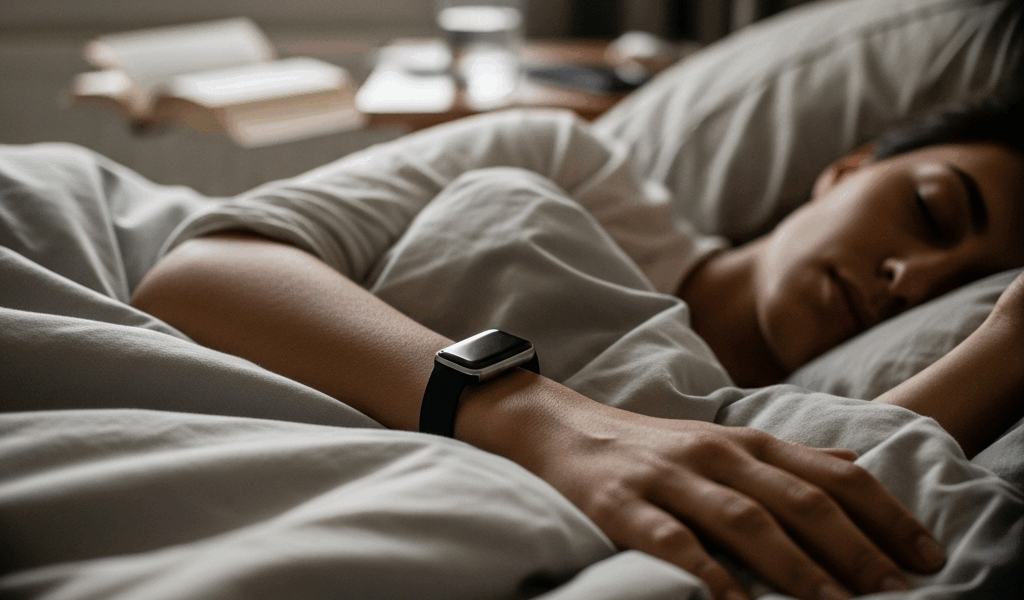
Best Sleep Trackers That Actually Improve Your Sleep
Finding the best sleep trackers that help you sleep better sounds straightforward until you realize most of them just hand you a colorful graph and call it a night. I spent about eight months rotating through four different wearables — Oura Ring Gen 3, Apple Watch Ultra 2, Whoop 4.0, and a Fitbit Sense 2 I eventually retired to my junk drawer — and the thing that surprised me most wasn’t the accuracy differences. It was how dramatically the devices varied in whether they actually pushed me to do anything differently. Spoiler: most of them don’t. They just make you feel like you’re doing something productive while staring at sleep stage breakdowns at 7 a.m.
This guide isn’t about which tracker has the prettiest app or the longest battery life. It’s about which ones changed my behavior, and whether the research backs that up at scale.
Tracking vs Coaching — The Difference That Matters
Probably should have opened with this section, honestly, because it reframes everything else.
There are two fundamentally different things a sleep tracker can do. The first is passive tracking — collecting heart rate variability, movement data, skin temperature, and blood oxygen, then presenting it back to you in a dashboard. The second is active coaching — taking that data and issuing a specific behavioral prompt. “Go to bed by 10:47 tonight.” “Your recovery is 34%. Don’t train hard today.” “Your sleep debt is 11 hours. Here’s a suggested schedule to recover it.”
Most trackers do the first thing. A handful do the second. That distinction is everything.
Think about it from a behavior-change perspective. Knowing you got 6 hours and 12 minutes of sleep last Tuesday doesn’t change what you do on Wednesday night. But receiving a notification at 9:30 p.m. that says your body temperature is elevated and your HRV trend suggests you need an early night — that might actually move you off the couch. The nudge matters. The data alone, in my experience, does not.
Passive trackers in this category include basic Fitbit models, Garmin’s sleep features on running watches, and most smartwatch sleep functions running out of the box without a companion subscription. They’ll show you light, deep, and REM percentages. They won’t tell you what to do about them.
Active coaching trackers — mainly Whoop and Oura at their premium tier — go further. They build a personal baseline over several weeks, then measure your daily state against that baseline and deliver specific recommendations. Whoop tells you what time to go to bed. Oura tells you whether your body is ready for stress or needs recovery. Apple Watch, sitting somewhere in the middle, uses bedtime reminders and trend data in the Health app but stops short of the aggressive coaching the subscription services offer.
The difference between passive and active isn’t just a feature list. It’s the difference between a scale that tells you your weight and a personal trainer who calls you at 6 a.m.
Oura Ring Gen 3 — Best for Sleep Coaching
Frustrated by wearing a watch to bed for months and still waking up exhausted, I switched to the Oura Ring Gen 3 in January and noticed something different within the first two weeks. Not in my sleep data. In my behavior.
The ring retails at $299 to $349 depending on the finish (I went with the Horizon style in silver, which looks like a plain band and doesn’t scream “biohacking weirdo” at dinner). There’s a $6 per month subscription on top of that, which I was skeptical about but ended up thinking was worth it once the Readiness Score started making sense to me.
Here’s what the Oura Ring does differently. Every morning, it gives you a Readiness Score between 1 and 100. That score synthesizes your sleep staging accuracy, resting heart rate, HRV balance, body temperature deviation, and respiratory rate. A score below 70 means your body is in recovery. Above 85, you’re optimized. The ring doesn’t just show you the number — it tells you which factor is dragging the score down. “Your body temperature was 0.6°C above your baseline last night. This often signals early illness or recovery from intense activity.”
That’s actionable. I started adjusting my training schedule, my alcohol intake on weeknights, and my screen time specifically because of low Readiness Scores. Not because I’m particularly disciplined. Because the app told me something concrete was wrong and gave me a reason to act.
The sleep staging accuracy is worth mentioning separately. Ring-based sensors sit over arteries in the finger, which gives them better photoplethysmography (PPG) signal quality than wrist-based devices. Independent studies published in sleep medicine journals have shown Oura Gen 3 performs closer to polysomnography results than most wrist wearables, though it’s still not clinical-grade. For a consumer device, the staging data feels trustworthy in a way that some wrist trackers don’t.
Battery life runs five to seven days depending on usage, and the charging time is about 20 to 40 minutes for a full charge. I charge it in the shower. There’s no display on the ring itself — all data lives in the app — which some people find annoying and I found freeing.
What it does well:
- Readiness Score with specific factor breakdown
- Body temperature trending (useful for illness detection and cycle tracking)
- Sleep staging that’s more accurate than most wrist devices
- Personalized sleep timing recommendations
- Comfortable enough that you actually forget it’s there
Where it falls short:
- $6/month subscription gates the most valuable features
- No real-time display — you get data in the morning, not during the day
- Sizing requires ordering a kit first, which adds friction to buying
If sleep improvement is the actual goal — not fitness tracking, not smartwatch features — the Oura Ring is the device I’d buy first.
Apple Watch Ultra 2 — Best for All-Day Wearers
The Apple Watch Ultra 2 costs $799 as of 2024, which is a significant premium for something you’re also wearing to check your calendar and pay for coffee. I already owned one before I started this comparison, so I didn’t buy it specifically for sleep tracking. That context matters — it’s a device you choose for all-day functionality that happens to include sleep features, not the reverse.
On sleep tracking specifically, the Ultra 2 is capable but passive by default. It monitors time in bed versus time asleep, cycles through light and deep sleep estimates, and tracks heart rate throughout the night. The Sleep Breathing Disturbances feature — added in watchOS 11 — is legitimately useful. It uses the accelerometer to detect irregular breathing patterns consistent with sleep apnea and flags them in the Health app for you to review or share with a doctor. That’s not nothing. For people who’ve never been screened for sleep apnea, it could be genuinely important information.
The bedtime reminder feature works through the Sleep app and lets you set a wind-down schedule — mine is set to 10:15 p.m. with a 30-minute wind-down that dims the watch face and enables Do Not Disturb. It works. It’s a nudge. It’s not aggressive coaching, but it’s a real behavioral prompt if you take it seriously.
What holds the Apple Watch back as a sleep tracker is the wrist placement. Wrist-based PPG sensors have more motion artifact and less reliable arterial signal than finger-based sensors, which affects sleep staging accuracy. The staging data exists, but I trust it less than my Oura data on the same nights.
The battery situation is also real. The Ultra 2 gets roughly 36 hours of battery life, which sounds like a lot until you realize charging it during the day means it’s often low by bedtime. I solved this by charging it for 30 minutes while I ate dinner. It’s manageable but requires a habit adjustment.
The no-subscription model is worth stating clearly. Everything the Apple Watch does for sleep tracking is included with the watch. No monthly fee. If you’re already in the Apple ecosystem and wear a Watch daily, turning on the Sleep app is a zero-friction upgrade with real upside, especially if the breathing disturbance detection is relevant to you.
Whoop 4.0 — Best for Athletes
Whoop is the most aggressive coaching device I tested. Aggressively. It will tell you you’re not ready to train. It will tell you to go to bed at 9:52 p.m. It will assign you a Recovery percentage every morning and make you feel vaguely guilty about a 28% score after a late night.
The hardware costs nothing upfront — the $30 per month subscription includes the device. That’s $360 per year, which made me wince, but the feature set at that price point is comprehensive. The Whoop 4.0 wristband is screenless and designed to be worn 24/7 including showers and sleep. The sensor array includes EDA (electrodermal activity), skin temperature, blood oxygen, and heart rate, all feeding into two core metrics: Recovery and Strain.
The Sleep Coach is where Whoop earns its price for athletes and performance-focused users. Each evening, it calculates the optimal bedtime to achieve “peak performance,” “perform okay,” or “get by” based on your next day’s planned strain and your current sleep debt. Those aren’t vague labels — they correspond to specific target sleep durations. The app will push a notification: “To peak tomorrow, be asleep by 10:22 p.m.”
Turned off by the subscription cost initially, I almost returned it after the first week. Then I started actually following the bedtime recommendations instead of just reading them. My average sleep duration over the following six weeks increased by about 47 minutes per night. That’s not a small change.
The research context here is meaningful. A 2021 study in the journal Sleep Health found that Whoop users who actively engaged with the coaching features reduced their sleep debt by an average of 1.8 hours over an eight-week period compared to a control group using passive trackers. The coaching mechanism — not the sensor hardware — was the variable that mattered.
The major downside is the price and the lack of smartwatch features. Whoop does one thing. It doesn’t show you notifications, it doesn’t have GPS, it doesn’t tell time visibly. If you want a single device, this isn’t it. If you’re an athlete who already wears a GPS watch during workouts and wants a dedicated recovery and sleep tool, the Whoop 4.0 is hard to beat.
Do Any of These Actually Improve Sleep
Yes. Some of them do. Not all of them.
Here’s my honest breakdown after eight months of testing: passive trackers — Fitbit Sense 2, basic Garmin sleep features, Apple Watch without active engagement — function as expensive, comfortable alarm clocks with interesting dashboards. They give you data you will look at for two weeks and then stop looking at. They do not change behavior at scale, and the research supports that. A 2020 review in Chronobiology International found no significant improvement in sleep quality outcomes for users of passive consumer sleep trackers compared to non-tracking controls after eight weeks.
Active coaching trackers are different. The Whoop Sleep Coach and Oura’s Readiness and sleep timing recommendations create specific, timely behavioral nudges. The bedtime prompt at 9:30 p.m. is a different category of intervention than a bar chart showing your sleep stages from last night. One asks you to act now. The other asks you to feel vaguely informed.
My biggest mistake in this whole process was spending the first three months treating all sleep trackers as equivalent and wondering why my sleep wasn’t improving. I was collecting data obsessively and changing nothing. The Oura app was telling me my sleep timing was inconsistent — I was going to bed anywhere between 10 p.m. and 1 a.m. depending on the night — and I was reading that information and nodding and doing nothing. It took Whoop’s aggressive bedtime notifications to actually move me.
The honest recommendation: if you want to track sleep as a hobby, any of these devices will give you interesting data. If you want your sleep to actually improve — earlier bedtimes, more consistent scheduling, reduced sleep debt — buy a device with active coaching features and engage with those features deliberately. Oura Ring Gen 3 at $299 plus $6/month is the best entry point for most people. Whoop 4.0 at $30/month is the right choice if you’re training seriously and want recovery coaching to integrate with your sport. Apple Watch Ultra 2 earns its place if you’re already in the ecosystem and want sleep breathing disturbance monitoring with no added subscription.
What none of these devices can do is make the decision for you. They can nudge. They can alert. They can build a readiness score that makes you feel genuinely bad about staying up until midnight watching television. But the behavior change is still yours to execute. The good news is that the coaching trackers make that execution considerably easier than staring at a pie chart and hoping for the best.

Leave a Reply