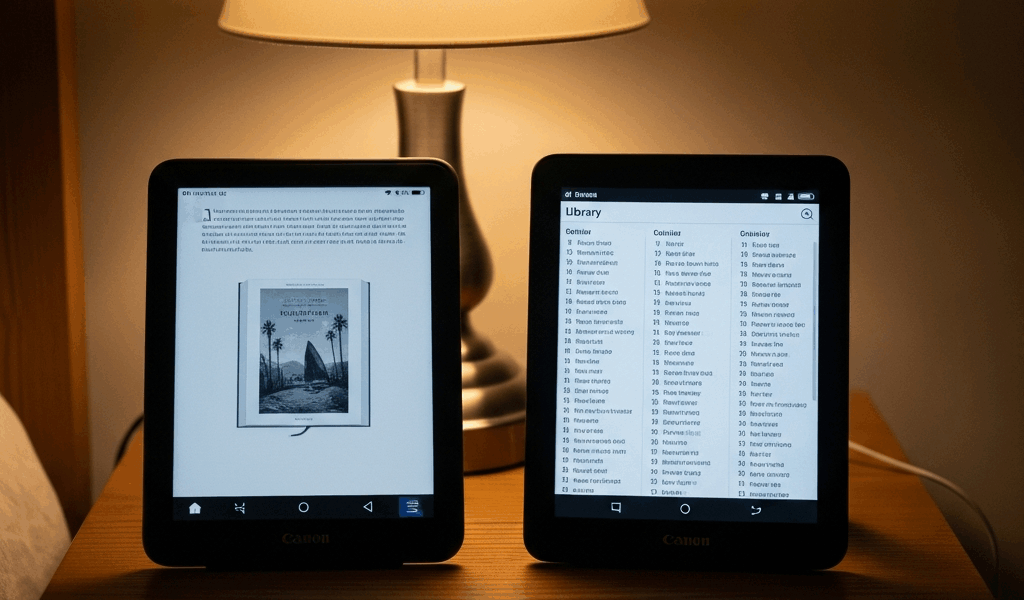
The Short Answer — Which One Should You Buy
Picking between the Kindle Paperwhite and Kobo Libra is harder than it needs to be with all the spec-sheet noise flying around. So here’s the verdict before anything else: the Kindle Paperwhite wins for most people. The ecosystem is massive, Audible works the way it should, and the Libby workaround — clunky as it is — gets the job done for anyone borrowing a book here and there. But if you’re pulling three or four library books a month through Overdrive, or you just really want physical page-turn buttons, the Kobo Libra Colour is the better device. Full stop.
This article includes affiliate links. We may earn a commission at no extra cost to you.
Our Top Picks
This section includes affiliate links. We may earn a commission at no extra cost to you.
I spent roughly six weeks rotating between both — on the train, in bed, once or twice in the bath like a person with questionable priorities — and I can tell you the winner almost entirely comes down to how you source your books. Everything else is secondary. Honestly.
Screen and Reading Experience Compared
Both run a 300 PPI E Ink display. On paper — no pun intended — they’re identical. In practice, they feel different in ways that actually matter to you mid-chapter.
The Paperwhite’s screen sits flush with the bezel. It looks cleaner, feels more premium in hand. The Kobo Libra Colour has a slightly recessed display in standard black-and-white mode — noticeable if you’re looking, invisible if you’re reading. Warm light on both devices is genuinely excellent. Neither one is going to punish your eyes at 11pm.
Here’s where Kobo pulls ahead for a certain kind of reader: typography. Granular control over line spacing, margins, font weight — the Kindle doesn’t come close. I didn’t think I cared about any of that until I loaded a dense nonfiction book on the Kobo with custom spacing and realized I’d been silently tolerating cramped text on my Paperwhite for years. That’s what makes the Kobo endearing to us heavy readers — the little adjustments add up. If you work through long, complex books regularly, this matters more than you’d expect.
Glare in sunlight is basically a tie. Both have anti-glare coatings. The Kobo’s front light felt marginally more even at lower brightness settings — marginally. Not worth anchoring a purchase decision to.
Library and Ebook Store Access
I’m burying the lede a bit — sorry. More people get the decision wrong here than anywhere else.
The Kobo Libra has native Overdrive and Libby integration. You link your library card in the device settings — takes two minutes — and from that point you browse, borrow, and read without ever leaving the Kobo interface. It works the way a feature should work. You barely notice it’s happening.
Kindle has no native Libby support. You can still borrow library books, but it means bouncing over to the Libby app and pushing the title through Amazon’s “Send to Kindle” pipeline. It works. It’s just annoying. Every. Single. Time.
Frustrated by that friction after borrowing my fourth library book in a single month, I nearly made the full switch to Kobo — and only didn’t because I had two years of Kindle Unlimited history and a shelf of purchased titles I wasn’t walking away from.
On subscriptions: Kindle Unlimited runs $11.99/month in the US and covers over four million titles. Kobo Plus is $7.99/month with a smaller catalog. Neither is perfect. For volume and name-brand titles, Kindle Unlimited leads. For readers who borrow rather than subscribe, Kobo’s library integration changes the math entirely.
- Kobo Libra — native Libby/Overdrive integration, frictionless library borrowing
- Kindle Paperwhite — Libby works via workaround, stronger subscription catalog, larger purchased ebook ecosystem
Build Quality, Battery, and Waterproofing
Both devices carry an IPX8 rating — submersible to two meters for up to 60 minutes. Stop treating waterproofing as a differentiator between these two. It isn’t one.
The Kobo Libra Colour weighs 199 grams. The Kindle Paperwhite 11th gen weighs 207 grams. Eight grams. Neither device is going to fatigue your hand — both are holdable through a long reading session without complaint, unless you’ve got a specific wrist situation going on.
What isn’t negligible: the Kobo’s physical page-turn buttons. Two buttons, left edge of the device, small and tactile and satisfying to click. Read in bed on your side — one hand on the device, the other hand irrelevant — and those buttons become genuinely wonderful. No more waking your partner by accidentally tapping the wrong corner of the screen. I knocked my Kindle progress back a full chapter once because my grip slipped at the wrong moment. Don’t make my mistake. The buttons solve a real problem.
Battery on both stretches several weeks under normal use — roughly four to six weeks reading an hour a day with wireless off. Neither device is going to strand you on a two-week trip. I’m apparently a heavy reader and the Paperwhite works for me while the Kobo never lagged behind it in any meaningful way. Some Kindle advocates claim the Paperwhite lasts longer — maybe marginally, but not in a way that changes behavior.
Build quality on both feels solid. The Kobo’s textured back grips better in a warm hand. The Kindle’s smoother back feels more premium — and slides more easily off a nightstand.
Who Should Buy Which — Final Verdict by Reader Type
Three kinds of readers come up constantly in these conversations. — with a direct answer for each.
The Casual Reader Who Buys Most Books
Buy the Kindle Paperwhite — 11th gen, $139.99. You’ll spend less time thinking about your device and more time inside your books, which is the entire point. The ecosystem is enormous, customer support is reliable, and if you’ve already accumulated Kindle purchases over the years, staying put is a genuine advantage rather than a compromise.
The Library Power User
Buy the Kobo Libra Colour — $149.99. Borrow eight or ten library books a month and native Overdrive integration alone justifies the switch. The Kindle/Libby workaround compounds across dozens of borrows into something that quietly erodes the enjoyment of reading. Kobo removes that entirely. That’s what makes it the right call here.
The Commuter
Buy the Kobo Libra Colour. Physical page-turn buttons make a real difference when you’re standing on a train, one hand gripping a pole. Reaching across the screen to tap with your thumb while holding on for your life is an awkward maneuver. Beaten down by months of daily subway commutes, I eventually stopped bringing my Kindle and made the switch specifically for this reason. No regrets.
Neither device is a bad purchase — genuinely. But what is [a good comparison article]? In essence, it tells you what to buy. Most never do. They list specs and let you flounder. The Kindle Paperwhite is the right default. The Kobo Libra is the right upgrade for specific needs. Know which one you are before you hit buy.

Leave a Reply