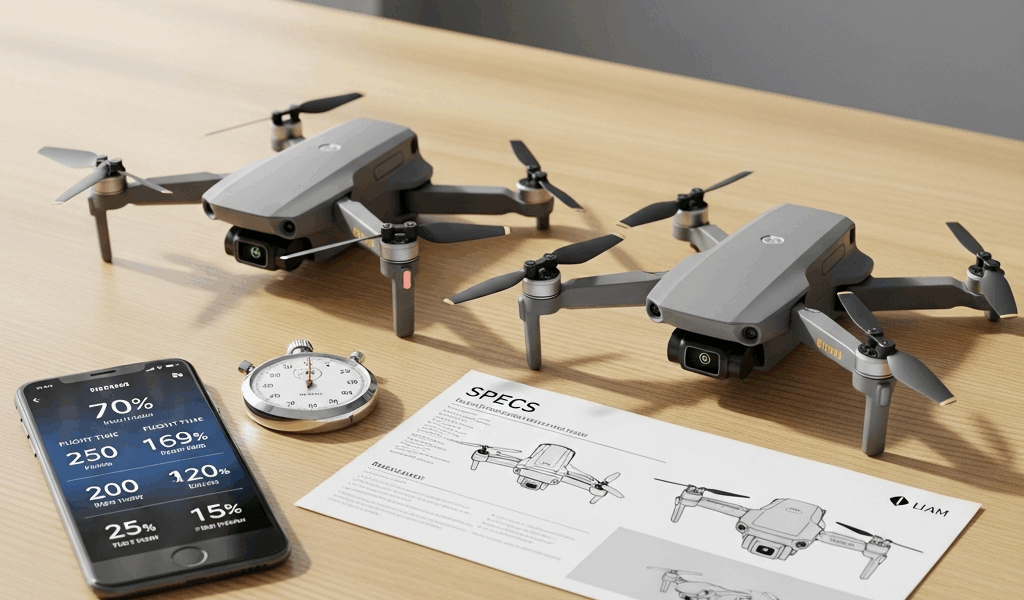
DJI Mini 4 Pro vs Mini 3 Pro — Which One Wins
The Short Answer — Which Drone Should You Buy
Drone comparisons are genuinely confusing these days with all the spec-sheet noise flying around. So here’s the verdict before anything else: get the Mini 4 Pro if you’re flying tight spaces, chasing moving subjects, or selling the footage you shoot. Get the Mini 3 Pro if you’re a weekend hobbyist cruising open fields who’d rather not pay $200–$300 more for obstacle sensors you’ll trigger maybe twice a year. That’s it. Everything below is just the evidence.
This article includes affiliate links. We may earn a commission at no extra cost to you.
Our Top Picks
This section includes affiliate links. We may earn a commission at no extra cost to you.
Sub-249g 4K drone with omnidirectional obstacle sensing, ActiveTrack 360, and 20km transmission
$959
Check Price on AmazonSub-249g 4K drone with tri-directional obstacle sensing, 48MP photos, and 34-minute flight time
$759
Check Price on AmazonI’ve flown both back to back — Mini 3 Pro first, then the Mini 4 Pro after it dropped in September 2023. I assumed the upgrade would be marginal. Don’t make my mistake. In certain situations, it wasn’t marginal at all. In others, it genuinely didn’t move the needle. The real question was never which drone is abstractly “better.” It’s which one matches how you actually fly.
Camera Quality — Is the Upgrade Real
Yes. But not across the board.
The Mini 4 Pro shoots 4K at up to 100fps. The Mini 3 Pro caps at 4K 60fps. That gap sounds small on paper. Then you try to shoot a mountain biker hauling downhill or a dog sprinting full speed across a field. At 4K 60fps you’re getting roughly 2.5x slow motion at 24fps playback. At 4K 100fps, that jumps to about 4x. On screen, the difference is real — motion that looks slightly stuttery at 60fps turns genuinely cinematic at 100fps.
Both drones shoot 10-bit D-Log M color profile — and that’s the detail most reviews breeze past entirely. Honestly, it matters more than frame rate for a lot of shooters. D-Log M gives you a flatter image with more dynamic range to work with in DaVinci Resolve or Premiere, holding highlight and shadow detail through the grade. If you’re delivering polished content to clients or just posting seriously edited travel videos, both drones get you there. The Mini 3 Pro isn’t behind on color science.
The Mini 4 Pro also adds a 2.7K 120fps mode for maximum slow-motion flexibility, plus a marginally improved sensor that handles low light better. Bright daylight? The two cameras look nearly identical. Shoot at dusk or under heavy tree cover and the Mini 4 Pro holds cleaner, less noisy detail.
Bottom Line on Camera
- Casual shooting, travel content, social media — Mini 3 Pro is completely sufficient
- Slow-motion work, paid client video, low-light environments — Mini 4 Pro earns its price difference here
Obstacle Avoidance — Who It Actually Matters For
Pausing for the bit that actually matters. This is the biggest real-world differentiator between the two drones — and the one most comparison pieces handle worst, either waving it off entirely or using it to justify the price jump with more drama than it deserves.
But what is omnidirectional obstacle sensing, really? In essence, it’s a system of sensors covering every angle of the drone — forward, backward, sideways, downward. But it’s much more than that when you’re flying somewhere complex. The Mini 3 Pro has forward and backward sensing only. Flying open fields or flat coastal areas, that’s completely fine. You’d have to actively work to clip something it can’t see.
The gap opens the moment your environment gets cluttered. Tree-lined paths. Subjects moving near buildings. ActiveTrack engaged while someone runs unpredictably through a parking lot. Those are the situations where the Mini 3 Pro’s side-blind spots become a genuine liability. I clipped a branch doing exactly that kind of tracking shot. The drone survived — barely — but it was a hit that the Mini 4 Pro’s APAS 360 system would have handled without drama. That’s what makes omnidirectional sensing endearing to us working drone pilots.
Frustrated by that branch incident, I started flying the Mini 3 Pro much more conservatively in tight environments. That conservation costs you shots. The Mini 4 Pro lets you push into tighter spaces with actual confidence — not recklessness, just confidence. For open-field hobbyist flying, though? The Mini 3 Pro sensors are sufficient. Don’t let anyone tell you otherwise just to inflate the upgrade case.
Flight Time, Range, and Portability
Both drones weigh under 249 grams. That’s not accidental — it’s a deliberate engineering target. In the US, UK, EU, and most major markets, staying under that threshold drops you into a lighter regulatory category with fewer registration requirements and operational restrictions. DJI has been extremely intentional about hitting that number on both drones, and for travel it’s a meaningful real-world advantage.
Flight time is closer than spec sheets suggest at first glance:
- Mini 4 Pro — up to 34 minutes on the standard Intelligent Flight Battery
- Mini 3 Pro — up to 34 minutes standard, up to 51 minutes with the Intelligent Flight Battery Plus
That Plus battery is a legitimate argument against upgrading — one most Mini 4 Pro advocates conveniently skip. Long survey sessions, expansive landscape coverage, or simply hating battery swaps mid-session? The Mini 3 Pro with the Plus battery runs dramatically longer than the Mini 4 Pro’s standard configuration. The Mini 4 Pro does offer its own Plus battery extending to 45 minutes, but at that point both options are costing you more on batteries regardless.
Transmission range on both is rated at 20km — O4 on the Mini 4 Pro, O3 on the Mini 3 Pro. In practice, you’re never legally flying 20km from yourself in most countries anyway. Real-world interference, airspace rules, and visual line-of-sight requirements make that spec mostly academic. Both drones hold stable, low-latency video feeds at any distance you’re actually allowed to fly. So, let’s move past that one.
Portability is essentially identical. Both fold to roughly the same compact form factor, fit the same travel cases, and slip into a daypack without drama. I’m apparently a chronic over-packer and my Lowepro Flipside case works for both while a larger bag never felt necessary.
Price Difference and Final Verdict
As of 2024, the Mini 3 Pro runs around $759 with the standard RC-N1 controller. The Mini 4 Pro starts at roughly $959 with the same controller. That’s a $200 gap at entry level — wider once you’re comparing equivalent bundle packages with the DJI RC 2 controller included on both sides.
Three Buyer Profiles
The weekend hobbyist — You fly on weekends, mostly parks or open countryside, not monetizing a frame of it. Buy the Mini 3 Pro. The camera is excellent, the flight performance is smooth, and you will genuinely not trigger those omnidirectional sensors enough to justify the extra spend. Put that $200 toward a set of ND filters and two extra batteries. You’ll thank yourself.
The travel content creator — You’re posting regularly to YouTube or Instagram, flying varied environments — cities, forests, coastlines, all of it. Buy the Mini 4 Pro. The slow-motion upgrade shows up in your finished videos, and omnidirectional sensing will save you from one expensive accident in a complex location eventually. At this level it’s a working tool, and the price gap is a legitimate equipment investment.
The semi-pro videographer — You’re delivering footage to actual clients. Real estate, branded content, events. Buy the Mini 4 Pro — at least if you want to stop second-guessing yourself mid-shoot. The 4K 100fps capability, improved low-light performance, and APAS 360 make it meaningfully more capable as a professional instrument. The Mini 3 Pro would technically handle many jobs fine, but the Mini 4 Pro removes friction exactly when shoots start pushing limits.
The One-Sentence Verdict
The Mini 3 Pro is an excellent drone that won’t embarrass you anywhere — but if you’re flying complex environments or selling what you shoot, the Mini 4 Pro justifies every dollar of the gap.


Leave a Reply